
SERENITY
Case Study:
UX/UI Design of a Healthy Screen Habits Super App
By Sarah Papadopoli & Alya Naseer


UNDERSTANDING THE PROBLEM
Introduction
If a user wants to lead a healthy lifestyle or accomplish certain health goals, usually they would install many different apps, each tracking or helping with very specific aspects of health. For example, one app would be used to track calorie intake, another the amount of steps taken, and yet another that would provide lists of recipes. To lead a well-rounded healthy lifestyle, these apps are not sufficient on their own. The user is required to install many apps and have to repeatedly switch between them and update its content, which is not a fulfilling and pleasant user experience nor one that is efficient.
Our Solution
Introducing Serenity, a super app for leading a well-rounded healthy lifestyle where the most common and most used tracking and health apps can be found in one place, on Serenity's dashboard. A user will be able to connect multiple tracking apps to Serenity as well as their favorite recipe app and fitness app. This way, throughout the course of the day, the user opens only Serenity and can view their information all in one place, offering a cohesive and hassle-free experience with information presented in an aesthetically pleasing and straight-forward way. The Serenity dashboard is also fully customizable. User's can choose which tracking apps they include and in which order they view them. These apps can include:
-
Screen time
-
Heart rate
-
Water consumption
-
Fitness activity
-
Calorie intake
-
etc.
-
Serenity includes a recipe and fitness page accessible through the homepage with several connection options given to the user. The full customizability of Serenity keeps the user experience in mind. Every user has their own needs when it comes to health and therefore deserves an app that will fit those goals in the way they see fit.
RESEARCH
Survey
We asked several volunteers to participate anonymously in an optional survey to better understand our user base and their desires for a health super app and what they would use it for if presented with one. We asked volunteers from different age groups, demographics and backgrounds to get an understanding of the general public. The results were needed to help us prioritize or abandon certain tracking apps.
The graphs presented below outline the results of our survey when asked if users were interested in certain tracking apps. The results were mostly as expected, although we were surprised to see the high interest in water consumption tracking and the mixed interest in calorie tracking.


The following graphs outline the results of specific questions with regards to user goals, data permissions and notifications. For the first graph, the detailed list of choices can be found underneath it.

A
B
C
D
E
F
G
H
I
J
K
L


Personas
We created three personas based on three different parts of a general demographic we believe would be the main users of our app Serenity.


Jennifer represents our younger demographic, those that are still in school or just finishing school. Usually, students live on a tight budget and have very active and everchanging lives. They do not live by routine since their schedules change constantly. They have to quickly adapt. In order to be successful, they need to stay organized and have good time management skills. They like things to be quick and convenient and they like services to offer instant gratification.


Kyle represents our slightly older adult who has found success in life, whether that be in their career, family or personal goals. While Jennifer lives an active and sometimes chaotic life, Kyle enjoys the simpler things in life and sticks to his firm routines. This demographic understands the importance of healthy habits and is more patient to achieve them.


Liana represents our middle-aged demographic who may still be working or who may have just retired. Most of this demographic have kids and/or a spouse, or if they are single, they are enjoying a more settled down lifestyle. Their health is of importance because of their age and tracking different aspects of it would be of interest. This demographic is responsible and they are responsive to health apps in general.
User Journey
We created a simple user journey to map out what a typical user would think, do and feel when trying to use health apps, which in most cases would be more than one. As you can see, by the end of the journey, the user feels defeated by the numerous apps. They were first excited at the prospect of exercising and tracking all in one app, but the frustration and disappointment increases quickly. Serenity will be able to fulfill that initial excitement.
.png)
User Flow
This user flow diagram shows what a user would expect when using Serenity, what buttons they would click, what pages they would land on, etc. Shown here are the multitude of features Serenity will offer, all of which are customizable on the home screen. After logging in, the three main modules are "tracking", "recipes" and "workouts". The tracking module will include smaller modules that can be rearranged, removed and added, while the recipe module and workout module can be connected to any other app the user chooses. This way, the user has all three major components in one app all accessible through the home screen. Instant tracking information and instant access to their favorite recipes and workouts are presented in a succinct and user-friendly manner.

PROTOTYPES
Inspiration
For inspiration for Serenity, we searched for health apps and found ones that are similar to the idea we were envisioning.

App: Health and Workout
Creator: Budiarti
The simple UI and the icons and color choices make for a readable home screen and one that is pleasing to the eyes.

App: Pink Dragon
Creator: YueYue
The modules on the home screen are movable, creating a custom space for a user. The dark blues and violets are appealing.

App: Scans Calories
Creator: J. Hong
The extra information and recommendations about calories is useful. The app gives friendly notifications to stay on track.

App: Sleep Session
Creator: Mira
The greeting and detailed information about a user's sleep is interesting. Again, the color scheme is pleasing to the eyes.

App: Meditation
Creator: Cuberto
The modules stacked on the home screen make for a simple UI that is easy to use and easy to identify.

App: Calorie Food Tracking
Creator: Roman
The white background and beautiful food images are appealing. The task bar at the bottom makes for easy navigation.
Sketches
We sketched out the different pages of Serenity based on our research, inspiration board and own creativity to fully begin the prototyping phase. This allowed us to cross off any inadequate ideas and to quickly create new ones at a whim. This saves time for the wireframes since it is on paper.
.jpg)
Wireframes
We chose to create wireframes to further our ideas and turn out sketches into digital reality. This way, we can evaluate the effectiveness of each idea.
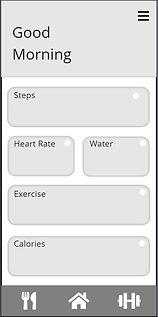
Home screen

Side Panel

Calories Page

Recipes

Filter Workouts

Manage Connections

Workouts

Filter Workouts
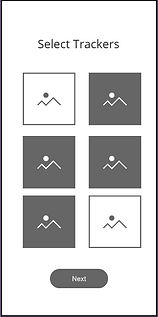
New Account

Login

Forgot Password

Sign Up
Final Design
For the final design, we chose a color a scheme for certain times of the day, as well as icons and images that we felt are appealing. We wanted the user flow to be easy to navigate and would require little to no learning curve. Below are screenshots of the main pages, afterwards you may interact with a live prototype.


Live Prototype using Figma
CONCLUSION
Combining our user research, inspiration and creativity allowed us to realize a super app that will act as a hub for all other health and lifestyle apps, allowing for a centralized zone for a user's health needs and goals. Serenity hopes to eliminate the frustration and overwhelming amount of options users may feel when trying to find health apps that perfectly fit their needs. Since Serenity is customizable and has the power to connect to other major health apps, a user can keep what they already like about other apps by adding them to Serenity, discover new ones that Serenity recommends and/or eliminate any disappointment of an external app's user experience. Serenity keeps the user experience in mind and is the only click a user needs when tracking a healthy lifestyle.
References
All design and persona photos: www.unsplash.com
Background video: www.pexels.com